SMT 00.5.70 Released!
by Michal Tinthofer on 17/04/2019New version of SMT is now available, you can have a look on the summary of changes.
Read moreFriday morning, the last day of the month. For finance and controlling departments, this is one of the most critical periods of the reporting cycle.
Our team received an urgent request: data in the customer's data warehouse had stopped progressing as expected. New records appeared to be flowing from the ERP system, but older and accumulated batches remained stuck in the extraction layer. The downstream staging process was not picking them up.
The customer needed an immediate investigation of the SSIS solution and a reliable way to move the missing records through the pipeline.
Rather than making unverified changes directly in production, our team first focused on reproducing the environment safely and tracing the data flow step by step.
The data warehouse used a conventional three-layer architecture fed by Microsoft Dynamics 365 Business Central.
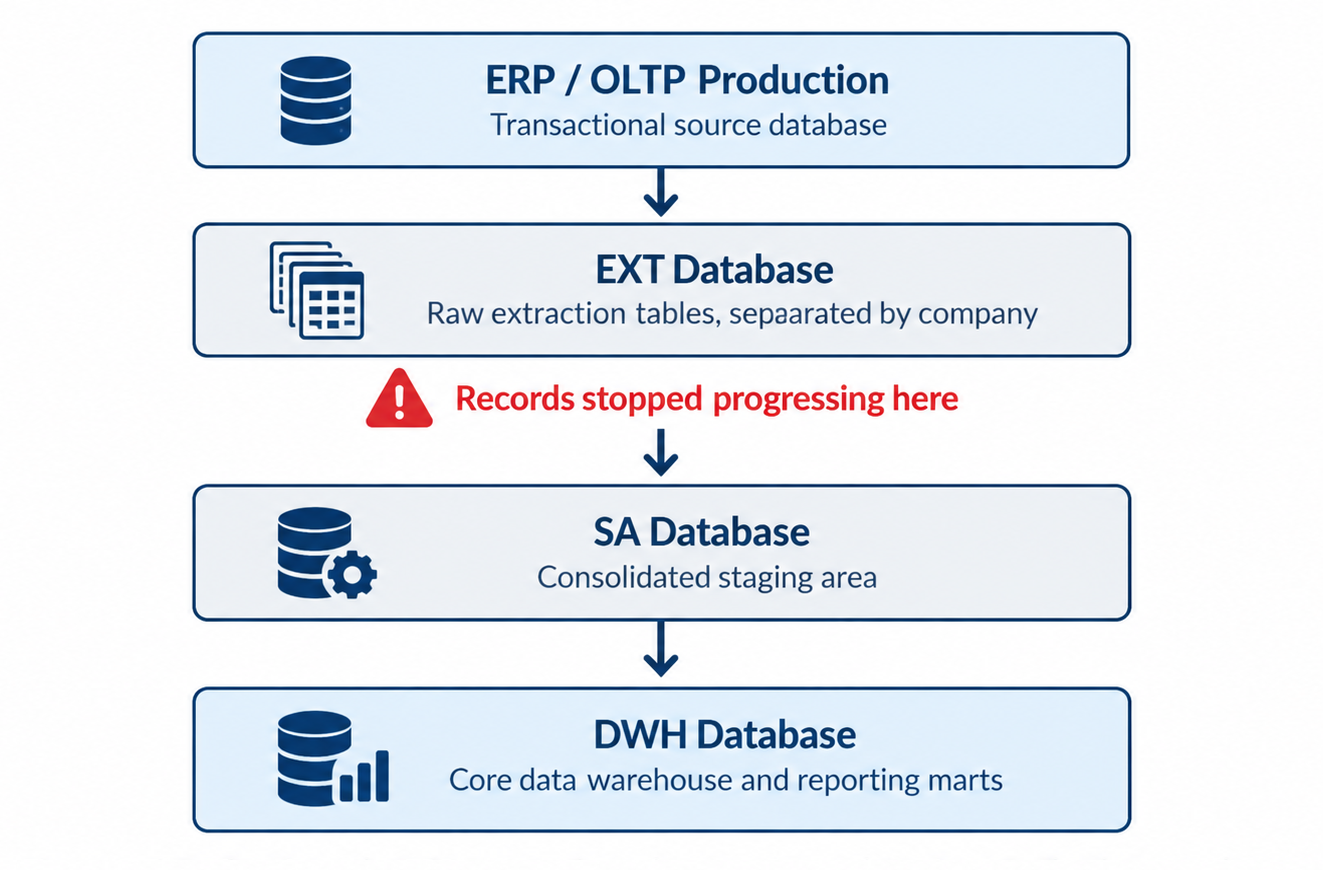
Figure 1. Data flow from the ERP system through extraction and staging into the data warehouse.
The transfer from the ERP system into the EXT layer was working. However, the SSIS process responsible for moving records from EXT into the consolidated SA staging table was silently excluding certain sets of records.
This distinction was important. The data had not disappeared from the source. It existed in the extraction layer but did not reach the next processing stage.
Debugging complex SSIS packages and running potentially expensive diagnostic queries directly against a production data warehouse during month-end closing would introduce unnecessary risk.
Our team therefore initiated a backup and restore of the relevant production databases into a dedicated test environment.
Once the investigation environment was prepared, the next step was to determine the actual extent of the missing records.
Our team compared the extraction table of one subsidiary with the consolidated staging table, using NOT EXISTS to identify records that had not reached SA.
SELECT posting_date, COUNT(*) AS MissingRowsCount
FROM EXT.dbo.T_CTR_Value_Entry_COMPANY_ALPHA ext
WHERE NOT EXISTS (
    SELECT 1 FROM SA.dbo.S_CTR_Value_Entry sa
    WHERE ext.Company = sa.Company
      AND ext.Entry_No_ = sa.Entry_No_
)
AND posting_date >= CONVERT(date, '2025-10-22')
GROUP BY posting_date
ORDER BY posting_date;
The results confirmed the scale of the problem. More than one million records were missing from the staging layer for a single subsidiary alone.
Those records were present in EXT, but they had never been transferred to SA. The investigation could now move beyond symptoms and focus on the SSIS processing logic.
While examining the SSIS package responsible for loading value-entry data, our team identified a task named Retrieve max value from target table.
The task executed a seemingly straightforward query:
SELECT MAX(LoadId) AS MaxLoadID
FROM SA.dbo.S_CTR_Value_Entry;
Despite its simplicity, the query took three to four minutes during production executions.
The reason was a missing supporting index on LoadId in the staging table. SQL Server repeatedly had to scan the table to determine the maximum value.
After adding the appropriate index, execution time dropped to a few milliseconds.
This removed a significant performance bottleneck, but it did not explain why certain records were being excluded from the loading process.
The more serious problem was hidden in the package’s incremental loading logic.
WHERE LoadId > @v_IncrementalThe key assumption was that a single global maximum could safely determine which records were new across all subsidiaries.
However, LoadId values were not coordinated by a single global sequence across companies. Each subsidiary had its own extraction table, and the tables received data at different rates.
The SSIS package could finish successfully while silently skipping valid records.
The following screenshots demonstrate how the global watermark affected different company-specific data sets.
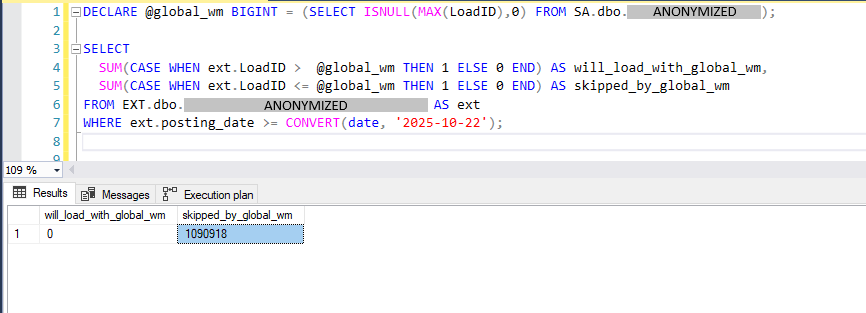
Figure 2. Incremental loading check showing 1,090,918 records that did not meet the global LoadId watermark condition in one extraction table.
In the first query, no records satisfied the condition LoadId > @global_wm, while 1,090,918 records fell below or at the global watermark.
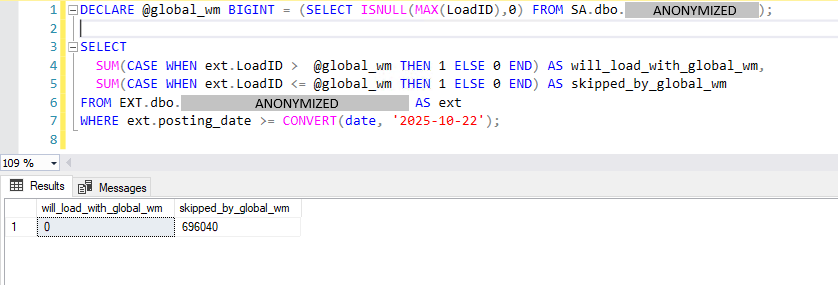
Figure 3. The same global watermark check against another company-specific extraction table, showing 696,040 records below or equal to the threshold.
A second extraction table produced a similar result, with 696,040 records below or equal to the global threshold and none above it.
These results show how a shared incremental watermark could exclude large groups of records from multiple company-specific sources.
The dynamic SQL generation logic confirmed that the same incremental variable was appended to the combined query.
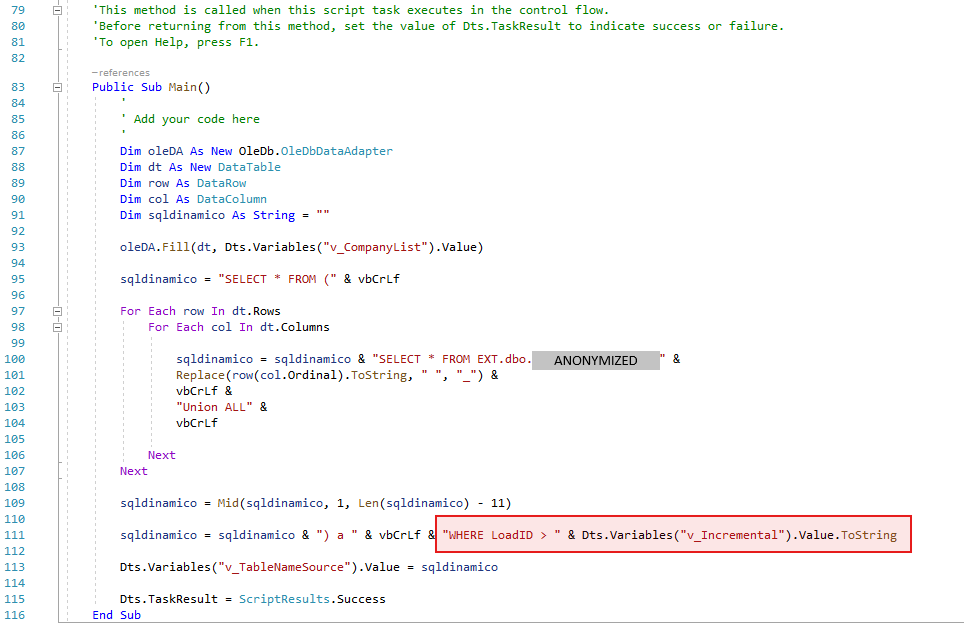
Figure 4. SSIS Script Task generating a UNION ALL query and applying a single LoadID threshold through the v_Incremental variable.
The highlighted part of the script shows the critical logic:
sqldinamico = sqldinamico & ") a " & vbCrLf &
    "WHERE LoadID > " &
    Dts.Variables("v_Incremental").Value.ToString
Rather than evaluating each company’s progress independently, the package applied one shared threshold to the combined data set. That was the underlying design flaw.
Instead of repeatedly correcting individual missing batches, our team proposed changing the SSIS query generation logic.
Each subsidiary should use its own incremental threshold, derived from the corresponding records already present in the staging layer.
A simplified example illustrates the proposed approach:
-- Company ALPHA
SELECT *
FROM EXT.dbo.T_CTR_Value_Entry_COMPANY_ALPHA
WHERE company_name = 'COMPANY_ALPHA'
  AND posting_date >= @DateWatermark
  AND LoadId > (
      SELECT MAX(LoadId)
      FROM SA.dbo.S_CTR_Value_Entry
      WHERE company_name = 'COMPANY_ALPHA'
  )
UNION ALL
-- Company BETA
SELECT *
FROM EXT.dbo.T_CTR_Value_Entry_COMPANY_BETA
WHERE company_name = 'COMPANY_BETA'
  AND posting_date >= @DateWatermark
  AND LoadId > (
      SELECT MAX(LoadId)
      FROM SA.dbo.S_CTR_Value_Entry
      WHERE company_name = 'COMPANY_BETA'
  );
With this approach, a subsidiary processing fewer transactions would no longer be affected by the higher LoadId values of another subsidiary.
The incremental watermark would reflect the progress of each company independently.
The proposed change addressed the underlying flaw in the incremental loading logic by tracking each company's progress independently. At the time of the investigation, the long-term production results had not yet been verified.
An incremental loading process is only as reliable as its watermark logic. When data sources maintain independent sequences, tracking progress globally can silently exclude valid records even when every ETL job reports success. This incident also shows how an ordinary programming mistake can compromise data quality: every SSIS change must therefore be thoroughly tested and validated before production deployment, regardless of time pressure or other demands.
Michal is a technically proficient SQL Server Specialist with a proven track record in resolving incidents and implementing changes within large-scale database infrastructures, ensuring maximum availability of services. Concurrently, as a Digital Content and Marketing Specialist, his priority is building strong online brand identities through strategic communication and creative storytelling. He consistently seeks new ways to enhance digital interaction, believing quality digital communication is key to success in today's connected world.
New version of SMT is now available, you can have a look on the summary of changes.
Read moreWhy even TYPE_WARNING fails to reveal hidden data materialization in tempdb, and how adjusting the sort order reduced form response time from 30 seconds to milliseconds.
Read moreFirst SMT release of 2023 has been made available
Read more