SMT 00.5.40 Released!
by Michal Tinthofer on 21/12/2017In this Christmas time we have some presents for you in form of new release. New reports and tuning notepad awaits you!.
Read moreIntermittent SQL Server errors are among the most difficult problems to troubleshoot.
A job can run successfully hundreds of times and then suddenly start failing. A restart can make the problem disappear. The same error may return days or weeks later, with no obvious change in the application code.
Our team encountered exactly this kind of situation in a customer environment where SQL Server jobs used OLE Automation to communicate with external APIs.
The problem initially appeared to be related to SQL Server worker thread availability.
But the investigation eventually led somewhere much deeper.
The affected SQL Server jobs executed stored procedures that used sp_OACreate to create COM objects for HTTP communication with external APIs.
The failures were intermittent, but their frequency began to increase.
The failed call returned the COM error “Cannot change thread mode after it is set,” corresponding to HRESULT 0x80010106 (RPC_E_CHANGED_MODE).
The failed sp_OACreate call then caused subsequent OLE Automation calls to fail as well, resulting in Error 10019:
sp_OACreate has not yet been called successfully
In some cases, the complete job execution ended with an application level error indicating that there had been no response from the API.
The particularly difficult part was that the affected procedures normally worked correctly.
There was no consistent failure on every execution.
Something in the execution environment was influencing the result.
The first investigation focused on SQL Server worker threads.
Monitoring showed that the number of operating system processes and threads increased significantly around the time the errors started appearing.
This made a shortage of available worker threads a reasonable initial hypothesis.
The timing seemed to support it.
However, the errors continued even after the number of workers had fallen again.
The correlation was there, but it did not fully explain the behavior.
This was an important turning point.
If the problem were simply caused by temporary worker thread exhaustion, the errors should have disappeared once the pressure was gone.
They did not.
The next step was to investigate what sp_OACreate itself was reporting.
Some of the affected procedures already contained error handling using:
IF @hr <> 0
BEGIN
    EXEC sp_OAGetErrorInfo @http, NULL, @responseText OUTPUT;
    RAISERROR (
        'Error creating HTTP request object: %s',
        16,
        1,
        @responseText
    );
END
However, sp_OAGetErrorInfo did not provide useful information.
Instead, the affected sp_OACreate calls could simply return NULL.
There was no meaningful error detail to work with.
That made the problem even more unusual.
The procedure was not necessarily failing because of an HTTP response, an API problem, or a conventional SQL Server error.
The failure was happening while SQL Server was trying to create the COM object itself.
As the investigation continued, our team performed a restart of the affected SQL Server environment.
The result was immediate.
The number of operating system processes and threads dropped from more than 200 to approximately 120.
More importantly, the sp_OACreate errors stopped occurring on the affected instance after the restart.
This was a valuable clue.
A restart had clearly changed something in the runtime environment.
But it was not a satisfactory long term solution.
The question was now: What state was the restart clearing?
Our team then examined the interaction between SQL Server worker threads and Windows Component Object Model, or COM.
This turned out to be the key to understanding the intermittent nature of the problem.
SQL Server reuses worker threads for different pieces of work.
COM initialization is thread-affine: a thread that has already entered one COM concurrency model cannot subsequently be initialized with an incompatible model.
This creates an important distinction.
The COM mode is not simply a property of the SQL Server session executing the stored procedure.
It is associated with the worker thread handling that execution.
That explains how the same stored procedure could succeed in one execution and fail in another.
If a worker thread had previously been initialized for one type of COM object and was later reused for a call requiring an incompatible COM mode, Windows COM could reject the attempt to change the thread mode.
The result was:
Cannot change thread mode after it is set
The problem therefore did not necessarily depend on what the procedure was doing differently.
It could depend on which worker thread happened to execute it and what COM state that thread already carried.
The investigation uncovered another important inconsistency.
The customer environment did not use a single HTTP COM component consistently across all procedures.
Among the components found were:
MSXML2.XMLHTTP
MSXML2.XMLHTTP.6.0
MSXML2.ServerXMLHTTP
MSXML2.ServerXMLHTTP.6.0
There were also procedures using:
WinHttp.WinHttpRequest.5.1
The most interesting finding concerned calls using:
sp_OACreate 'MSXML2.ServerXMLHTTP'
without explicitly specifying a version.
The investigation of the Windows registry showed that these version-unspecified references resolved to version 3.0 on the affected SQL Servers, even though version 6.0 was also installed.
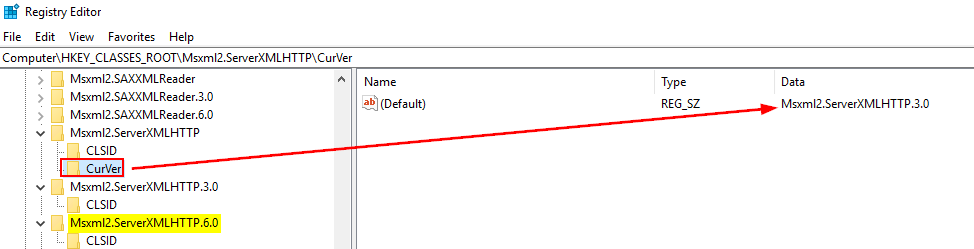
This created an environment where different procedures could initialize different COM components depending on how they made the sp_OACreate call.
Combined with SQL Server worker thread reuse, this provided a plausible explanation for why the problem appeared sporadically.
At one point, a retry mechanism was considered as a possible workaround.
The idea was straightforward.
If sp_OACreate returned an unsuccessful result, the procedure could wait briefly and try again.
However, the customer team deliberately did not implement this immediately.
There was a good reason.
A retry might make the job succeed without actually solving the underlying problem.
A retry can hide an intermittent error without eliminating its cause.
The investigation therefore continued instead of treating retry logic as the final solution.
The next step was a review of the stored procedures using sp_OACreate.
The investigation found procedures where COM objects were created without an explicit sp_OADestroy call.
Our team recommended adding the cleanup operation to the relevant procedures.
The purpose was not to reset the COM mode of the worker thread.
It does not do that.
Instead, sp_OADestroy explicitly releases the COM object as soon as it is no longer needed. SQL Server would otherwise destroy the object automatically at the end of the batch, so this change improves deterministic cleanup but does not by itself prove or remove the COM threading-mode conflict.
The relevant procedures were subsequently updated.
The second major preventive measure was to remove the ambiguity around HTTP component versions.
Our team reviewed the procedures using sp_OACreate and recommended standardizing the relevant calls on:
MSXML2.ServerXMLHTTP.6.0
instead of relying on the version-unspecified:
MSXML2.ServerXMLHTTP
This change removed an unnecessary variable from the environment.
Every relevant API communication procedure could now use the same explicitly defined HTTP component version.
This was particularly important because the investigation had shown that the version-unspecified component was resolving differently from what the developers might have expected.
The review revealed that the problem was not isolated to a single stored procedure.
A larger number of procedures used sp_OACreate, and the team therefore had to identify the relevant procedures and update them systematically.
The customer team updated the identified procedures, including the addition of sp_OADestroy where it was missing and the standardization of the relevant HTTP component usage.
The scope was intentionally broader than simply fixing the procedure that happened to fail most often.
The goal was to remove the underlying inconsistencies from the environment.
OLE Automation Procedures are disabled by default and execute COM automation in a server-wide shared environment. Their use should therefore be limited, secured and monitored; where practical, HTTP integration should be moved outside the SQL Server Database Engine.
Because the original problem was intermittent, the changes could not be considered successful simply because the next job execution worked.
The environment was monitored over an extended period.
The job history was reviewed across the main SQL Server instances.
The result was clear.
During the three month monitoring period, zero sp_OACreate errors were recorded.
Even the occasional one to three errors per week that had previously been observed were no longer present.
At the same time, operating system process counts remained below the desired threshold on the monitored SQL Servers, apart from occasional spikes associated with administrator activity.
This investigation demonstrated why intermittent SQL Server problems can be so difficult to diagnose.
The initial evidence pointed towards worker thread pressure.
A restart temporarily removed the symptoms.
Standard OLE Automation diagnostics returned no useful information.
The actual explanation only emerged after looking at the interaction between SQL Server worker thread reuse and Windows COM initialization.
Calling sp_OADestroy releases the COM object, but it does not reset the thread’s COM concurrency model. The error originates in Windows COM rather than in the SQL Server Database Engine itself. COM initialization is thread-affine, so the concurrency model is associated with the executing thread, not with the SQL session.
Once a thread has been initialized in a particular model, a later attempt to initialize it with an incompatible model can return “Cannot change thread mode after it is set.” Because SQL Server reuses worker threads, the same stored procedure may execute on threads with different prior initialization histories.
This provides a plausible explanation for the intermittent behavior: a failure may occur when an execution is assigned to a worker thread that was previously initialized with an incompatible COM concurrency model.
However, selecting a different COM in sp_OACreate does not by itself prove that a different concurrency model was requested; confirming that mechanism would require evidence from the relevant COM registrations or lower-level tracing.
The final preventive approach consisted of several complementary measures:
When an intermittent error disappears after a restart, the restart may have cleared the symptom rather than fixed the cause.
Michal is a technically proficient SQL Server Specialist with a proven track record in resolving incidents and implementing changes within large-scale database infrastructures, ensuring maximum availability of services. Concurrently, as a Digital Content and Marketing Specialist, his priority is building strong online brand identities through strategic communication and creative storytelling. He consistently seeks new ways to enhance digital interaction, believing quality digital communication is key to success in today's connected world.
In this Christmas time we have some presents for you in form of new release. New reports and tuning notepad awaits you!.
Read moreRecently I had some issues with SQL server 2008 R2 service pack 1 installation. From first perspective it looks like an issue with corrupted installation package, but true issue was somewhere else. It was a windows installer.
Read moreSo after some time we are returning to presenting roadshow starting with Show IT Bratislava. Lets have a look at our session list.
Read more