Tool to measure Index Selectivity
by Michal Tinthofer on 05/06/2012Sometimes when you plan to change your index design is good to know the columns of your tables. But not just a data type and max size.
Read moreIf you haven't been living under a rock for the last 10 years (14 if you count the read-only days), you've probably heard about SQL Server's columnstore engine.
Instead of storing data row by row like your good old B-tree indexes, SQL Server stores it column by column. Microsoft designed it for data warehouses and analytical workloads - think giant scans, aggregations, dashboards, and people who use the word synergy in meetings.
That's the sales pitch. What gets way less attention is the compression.
Microsoft in its documentation promises "up to 10× compression" which is generally somewhere between "technically true" and "it depends". Luckily for all database administrators, Microsoft was kind enough to give us sp_estimate_data_compression_savings procedure to estimate how much data we can save with each of the compression options SQL Server offers.
We took this function and called it on customers’ audit tables which use BIGINTs and NVARCHARs (up to 1000 characters) to store every change made to records. Each row contains the previous version of the record, the new version, who made the change and when it happened. These audit / log tables contain highly repetitive strings such as property names, JSON/XML fragments, user IDs, etc. which is exactly the kind of redundancy the columnstore compression algorithms exploit:
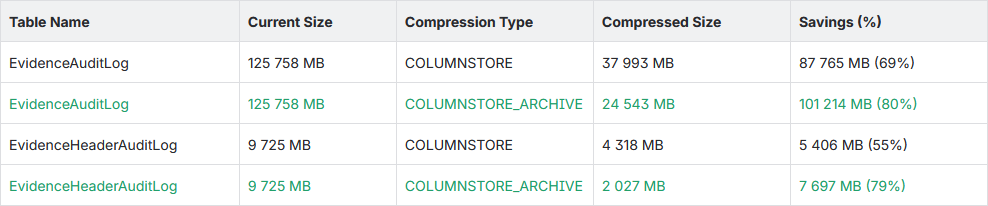
COLUMNSTORE_ARCHIVE compression type pushed compression close to 80% while the tables are essentially append-only audit logs. That's exactly the type of workload where paying a little extra CPU during compression is a bargain. Saving over 100 GB on a single table, where total database size is 230 GB, means smaller backups, less storage, more useful pages in the buffer pool, and less I/O whenever the table is scanned.
Even though ColumnScore won’t recommend it, why does columnstore work in this case? Imagine you have an application database with a log or audit table where:
Does this sound familiar? Congratulations! You’ve just found a great candidate for a clustered columnstore index. No matter that it is in application OLTP database and rows are inserted one by one and not in batches. Are you scared of data movement from delta store to compressed column in the middle of the day? That’s what COMPRESSION_DELAY parameter is for. It lets you control how long newly inserted rows remain in the delta store before becoming eligible for compression.
So yes, you can have a clustered columnstore index on a table sitting happily inside your application OLTP database.
"But I need Index Seeks!"
The moment someone mentions replacing the clustered index with a clustered columnstore index, every DBA instinctively reaches for the panic button because "it's going to scan everything!"
Not necessarily. SQL Server 2016+ allows nonclustered rowstore indexes on top of a clustered columnstore index, so you can simply create traditional B-tree indexes for the columns your application frequently searches on.
Need to look up logs of a specific UserID or SessionID? Create a nonclustered index. Your application will keep using Index Seeks, while the rest of the table enjoys massive compression.
Continuous Columnstore Improvements (CCI:)
After the rough start, Microsoft continues to work on columnstore engine:
SQL Server 2016 SP1 and later versions made columnstore indexes available in all SQL Server editions, so you cannot make licensing excuses anymore.
Starting with SQL Server 2019, the tuple mover is helped by a background merge task that automatically compresses smaller open delta rowgroups that have existed for some time, or merges compressed rowgroups from where many rows have been deleted.
SQL Server 2022 introduced ordered columnstore indexes. Well... ordered-ish. If your log table is mostly queried by date, ordering the columnstore on the timestamp column can make those occasional investigations noticeably faster while keeping all the compression benefits.
SQL Server 2025 adds online creation / rebuild of ordered columnstore indexes, improves sort quality for ordered columnstore indexes, and improves shrink operations when clustered columnstore indexes are present.
These and many more improvements can be studied at Microsoft Learn.
Don't Put It Everywhere
Before you run off replacing every clustered index in your OLTP database... "Don't".
Columnstore is fantastic for append-heavy tables with rare updates. It is considerably less fantastic for tables that spend their lives processing UPDATEs and DELETEs. The deltastore, delete bitmap, and tuple mover all exist for good reasons, but they're not magic.
Use it where it makes sense. And as always, test your index modifications in non-production first.
Sometimes when you plan to change your index design is good to know the columns of your tables. But not just a data type and max size.
Read moreIn high-performance SQL Server environments, how you "slice" your CPU resources is just as important as how many cores you have. We recently tackled a case where a customer was plagued by high SOS_SCHEDULER_YIELD and CXPACKET waits.
Read more